Risk Panel for NinjaTrader 8
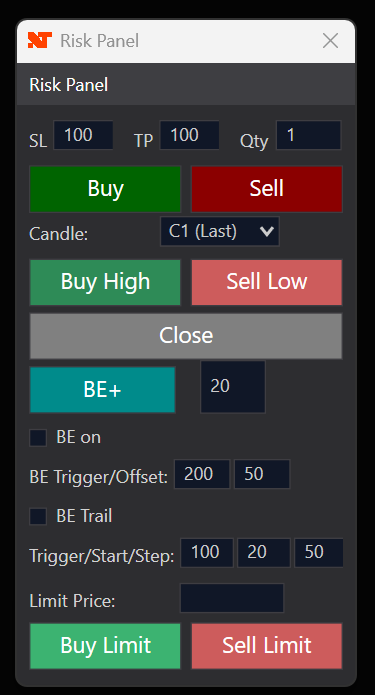
The **Risk Panel** is a NinjaTrader 8 strategy that provides a compact control panel for fast risk management directly at the chart
**Usage:** One strategy equals one panel plus all orders. The panel opens as a separate window next to the chart and controls entries, stop loss, take profit, and break-even
SL and TP are sent as separate orders; when one fills, the other is cancelled automatically.
**Main features:**
- **Buy / Sell** – Market orders with immediate SL/TP (configurable in ticks).
- **Buy High / Sell Low** – Stop-market orders at the high/low of the selected bar (current, previous, or two bars ago).
- **Buy Limit / Sell Limit** – Limit orders at a user-defined price.
- **Close** – Close position or, when flat, cancel all open entry and SL/TP orders.
- **BE+** – Manual break-even plus: move stop to entry + X ticks; each additional click moves the stop another X ticks in profit direction.
- **Auto BE** – Optional: after X ticks in profit, set stop to entry + Y (trigger/offset).
- **BE Trail** – Optional: after trigger ticks set stop to entry + start; then, for every further step ticks in profit, move the stop by step ticks (trailing).
**Panel settings:**
- SL/TP ticks and lot size for new trades.
- BE trigger/offset (auto break-even).
- BE Trail: trigger/start/step for automatic trailing of the stop.
- Optional: debug section with status, position, orders, and last actions.